Four-channel freedom
Four standalone playback decks and four physical faders give the DJ room for layered sets and more involved transitions.
Music, mixing and lighting integration in a single event-ready format. Explore the original Prime 4’s standalone capabilities, USB preparation and software options before confirming your DJ’s brief.
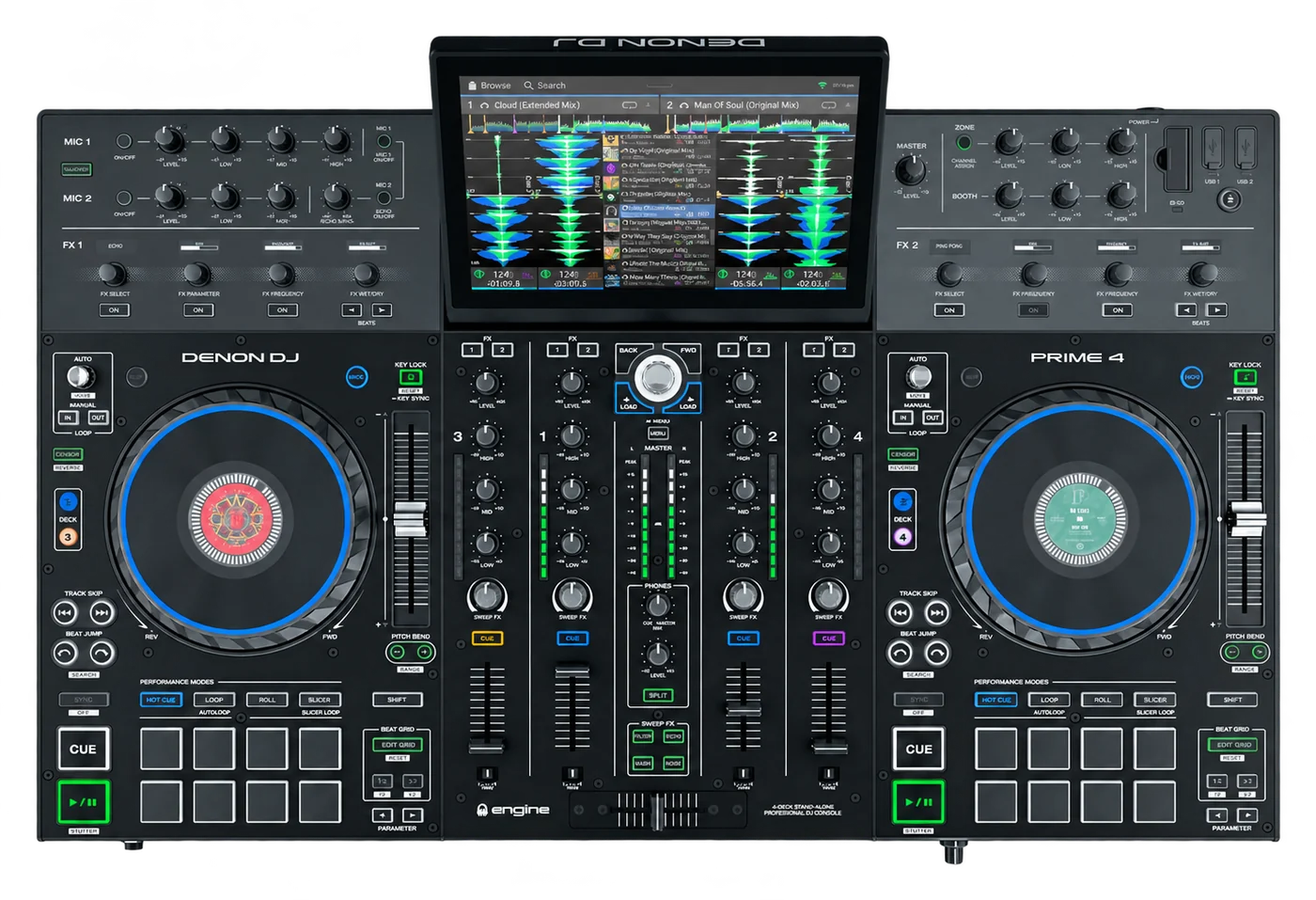
Four standalone playback decks and four physical faders give the DJ room for layered sets and more involved transitions.
Discuss microphones, a separate output zone and lighting control as part of the event brief, rather than choosing the console in isolation.
Supported USB workflows and computer-controller options give you several preparation routes. Agree the exact workflow with the artist.
Check booth space, media and connections with your production team. Dimensions are for the unit without its case; allow room for cables and the raised display.
Discuss Prime 4 hire ↗Denon documents native reading of rekordbox-prepared drives, including music, playlists and Hot Cues. You can also prepare a library in Engine DJ Desktop before exporting it for standalone playback.
Allow time for the Prime 4 to import and analyse the tracks. Check cue points, loops and beatgrids before the set. USB library compatibility does not make the Prime 4 a native rekordbox performance controller.
Standalone playback, library import and laptop control are different functions. This is the confirmed compatibility picture for the original Prime 4; check the exact software, operating system, licences and firmware for your booking.
| Software / library | How it works | What to check |
|---|---|---|
| Engine DJ OS | Built-in standalone operation | Runs the unit without a performance laptop. Compatibility reference ↗ |
| Engine DJ Desktop | Library preparation | Prepare and export an Engine library before the event; older documentation calls this Engine Prime. Compatibility reference ↗ |
| rekordbox | Prepared USB / SD media | Read supported exported libraries, playlists and Hot Cues. This does not mean rekordbox performance software runs on the console. Compatibility reference ↗ |
| Serato DJ Pro | Computer controller mode | PRIME 4 unlocks Serato DJ Pro. DVS is a separate paid upgrade; confirm drivers and versions. Compatibility reference ↗ |
| VirtualDJ | Computer controller mode | Supported in computer mode. A Pro Infinity or Pro Subscription licence is required. Compatibility reference ↗ |
| Algoriddim djay / djay Pro | Platform-dependent controller support | Listed by Algoriddim, with main-screen and, on some platforms, deck 3/4 limitations. Confirm the exact platform and app version. Compatibility reference ↗ |
| Traktor Pro | Library import / preparation | Import a supported collection into Engine DJ for standalone playback. Library import is different from direct Traktor controller integration. Compatibility reference ↗ |
| iTunes / Music libraries | Library import / preparation | Import supported local music collections. This is not a promise that Apple Music subscription downloads will play. Compatibility reference ↗ |
| SoundSwitch | Lighting integration | Use Engine Lighting standalone, or a computer-based SoundSwitch setup via StagelinQ, with the appropriate interface and project. Compatibility reference ↗ |
Denon also lists Beatport, Beatsource, SoundCloud Go+, TIDAL and Dropbox access for Prime 4. Availability depends on the installed software, region, network and any required subscription. These are online services, not extra standalone decks.
StagelinQ also supports specialist integrations such as Resolume and Timecode. Include any visual, timecode or lighting requirements in the production brief so the computer, software and configuration can be agreed separately.
Engine Lighting brings SoundSwitch lighting control onto supported Engine DJ hardware. It can use exported SoundSwitch projects without a laptop running the performance, while StagelinQ offers a separate route to a computer-based SoundSwitch system.
For wired DMX, use an official supported SoundSwitch interface, such as the Micro DMX Interface or Control One, with an appropriately configured lighting rig. There is no direct DMX socket on the Prime 4, and third-party USB-DMX dongles are not interchangeable with Engine Lighting hardware.
The Prime 4’s four-deck architecture and Engine Lighting are meaningful advantages when the event needs them. The XDJ-RX3 remains a different choice for DJs who prefer the Pioneer DJ two-deck workflow. A feature comparison does not replace artist approval.
| Feature | Denon DJ Prime 4 | Pioneer DJ XDJ-RX3 |
|---|---|---|
| Standalone playback | 4 decks, 4 mixer channels | 2 decks, 2 mixer channels |
| Physical deck controls | 2 jog wheels with deck-layer selection | 2 jog wheels |
| Main display | 10.1-inch touchscreen | 10.1-inch touchscreen |
| USB workflow | Engine library and supported rekordbox exports | rekordbox-prepared USB playback |
| Standalone lighting | Engine Lighting; official SoundSwitch DMX interface required | No onboard Engine Lighting; use a separate lighting-control system |
| Storage options | 4 USB-A ports, SD slot, optional internal SATA drive | 2 USB-A media ports |
| Microphones | 2 dedicated mic channels | 2 mic inputs |
| Extra output zone | Dedicated balanced XLR zone output | Master and booth outputs |
| Dimensions W × D × H | 728.47 × 496.82 × 103.63 mm | 728.1 × 469.5 × 118.4 mm |
| Weight | 9.7 kg | 9.3 kg |
Sources: Prime 4 ↗ · XDJ-RX3 ↗. Comparison concerns standalone features, not external laptop or third-party expansions.
With Prime 4, the four channels are real physical mixer strips, not four jog wheels. Deck-layer buttons select the playback deck controlled by each side. The zone output also needs its routing agreed; do not assume an extra fifth playback deck.
Yes. Denon documents support for rekordbox-prepared media and importing music, playlists and Hot Cues. Test the actual export and installed Engine DJ version before the event, and allow time for track analysis.
Yes. Prime 4 provides four-deck standalone playback and four physical mixer channel strips. Its two jog wheels switch between deck layers; it does not have four separate jog wheels.
Engine Lighting can run on the hardware without a performance laptop, but wired DMX requires an official compatible SoundSwitch interface and a configured lighting rig. Prime 4 does not have a built-in DMX output socket. Lighting hardware and services must be agreed in the quote.
No. Prime 4 offers four standalone decks and Engine Lighting integration, but the RX3 has a different Pioneer DJ workflow. Confirm the named model with the artist before agreeing a substitution.
Share the venue, date and your DJ’s requirements with Pegasus Sound & Light. Confirm Prime 4 availability, any software or lighting hardware, and the complete hire scope in your quote.